




It’s time for a three-week update on my RightBlogger experiment.
I’m using RightBlogger across three very different websites:
- A brand-new website with no articles, backlinks, or search history.
- A personal website I’ve owned for several years, with a random collection of topics.
- A website I purchased through MotionInvest with more than 80 articles, thousands of Google impressions, and very few clicks.
Each website has a different problem, which makes this a more useful test than simply using an AI tool on one site. My hope is that by using RightBlogger on 3 very different sites, it gives a very clear idea at what it’s most useful for, as well as what situations it may not be particularly suitable for.
Website #1: Starting With a Brand-New Site
The first website started with almost nothing. It had a domain name, no articles, no links, and no traffic.
After three weeks, it has 14 articles and is beginning to receive search impressions. I’ve also seen some visitors, although it’s still far too early to make any big claims.
The RightBlogger Content Planner has handled most of the article planning. I receive an email when a new article is ready, review it, make any edits I want, and then publish it.
Fixing the Website Navigation
Yesterday, I discovered that the website navigation wasn’t set up correctly.
The articles had been placed into categories, but the navigation menu didn’t include the articles under the correct sections. This meant visitors couldn’t easily find the content through the main menu.
I spent about two hours trying to understand what had happened. I even used ChatGPT to help me figure out the WordPress settings and connect the categories to the navigation menu.
It wasn’t the most enjoyable way to spend an afternoon, but the problem is fixed now.
I also:
- Wrote the About page
- Added a Privacy Policy
- Combined overlapping menu sections
- Cleaned up the website categories
- Added the articles to the correct navigation areas
This was useful work, but it also reminded me that AI tools can’t handle every part of building a website for you. RightBlogger can help with content and SEO, but I still need to understand how the WordPress website is organized.
I still don’t understand why the WordPress theme didn’t automatically connect the pages and categories to the menu. Maybe there was a setting I missed, but it made the setup more confusing than it needed to be.
Three Weeks on the New Website
Here is the RightBlogger AI Site Agent dashboard after three weeks.
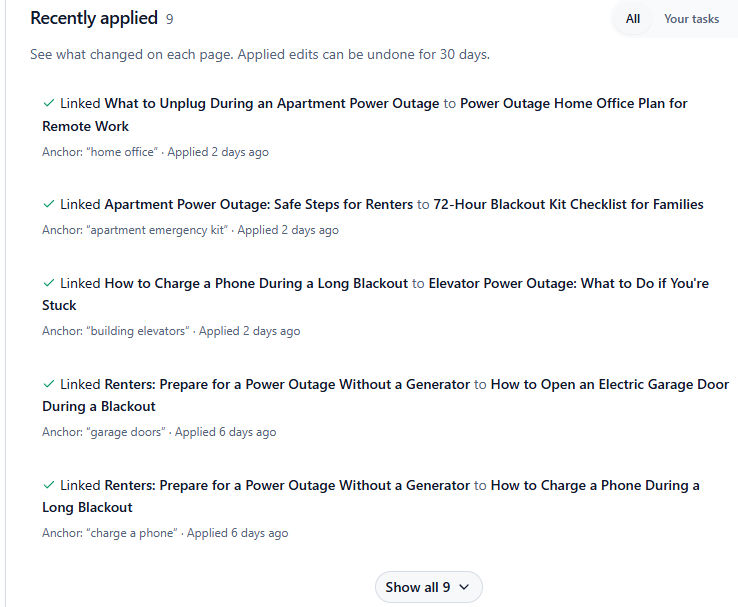
RightBlogger has handled most of the SEO work on this website. I used ChatGPT to help me write instructions for the AI Agent, but after that, the article creation and internal linking have required very little work from me.
The current schedule is five articles per week. When RightBlogger sends me the email saying a new article is ready, I open it, read through it, make any changes, and publish it.
I don’t publish AI-generated content without reviewing it first. The articles have been useful so far, but I still need to check the information, adjust the wording, and make sure each article fits the website.
Website #2: My Personal Website With Too Many Topics
The second website is one I’ve owned for a couple of years.
The problem with this site is that I kept adding articles about whatever I was testing at the time. Some weeks I wrote about one subject, then moved to something completely different the next week.
The site has a scattered collection of content instead of a clear focus.
For now, I’m not rewriting the older articles. I’m using RightBlogger to publish five new articles each week and watching what happens.
The site has a Domain Rating of 20, so I also joined the RightBlogger Link Exchange. So far, I’ve provided four links and haven’t received one in return yet.
That doesn’t bother me right now. The four links I’ve given were to websites with strong domain ratings, and I think those links may still help my site. My website had some authority already, but it wasn’t receiving much traffic, so I need to see whether better organization and more useful connections between articles can improve the results.
Week 3 AI Agent Updates
I gave the RightBlogger AI Agent instructions through ChatGPT, and it has been working on several tasks automatically.
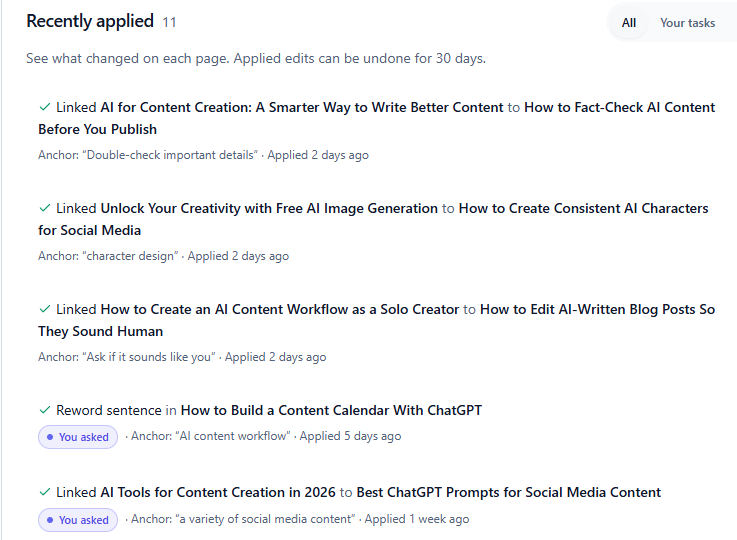
You can see the AI Agent has been:
- Adding internal links between related articles
- Rewriting sentences that were difficult to understand
- Updating SEO titles and meta descriptions
- Finding and correcting basic SEO problems
This has also been mostly hands-off. I receive an email when a new article is ready, review it, and publish it.
The bigger test for this website is whether adding more relevant content can help a site that doesn’t have a clear subject. It may need new articles, but it may also need better categories, stronger internal links, and a more focused content plan.
Website #3: Improving a Website Purchased From MotionInvest
The third website came with more than 80 articles and was already receiving thousands of Google impressions.
The problem was that very few people were clicking through from the search results.
Many of the articles needed to be rewritten. Some were difficult to read, and several had weak titles and meta descriptions. The site had content, but the content needed a major cleanup.
Rewriting Existing Articles
RightBlogger has an Article Rewriter tool that allows me to enter an existing article and have the platform rewrite it.
The rewritten articles have been easier to understand, and the SEO scores have improved in many cases. I’m now close to 50 rewritten articles.
I don’t delete the original article when I use the rewriter. The original page already has search history and impressions, so I copy the updated content into the existing post instead.
That lets me improve the page without creating a completely new URL and losing the history connected to the original article.
AI Agent Progress
The RightBlogger AI Agent has made 19 updates to this website so far.
It has found opportunities for internal links, updated SEO descriptions, and improved sections that needed clearer wording. Some changes are small, but they make the pages easier to read and better organized.
The dashboard shows what was changed, which makes the updates easier to review. If I disagree with a change, I can undo it within the available review period.
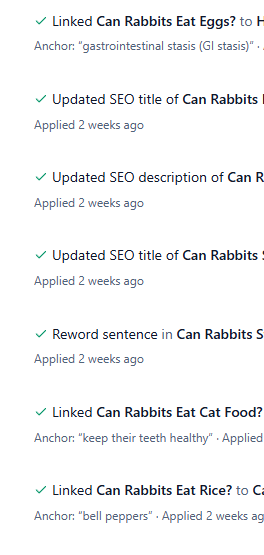
I haven’t needed to reverse any changes so far, but having that option is helpful. I don’t want an AI tool making permanent changes that I can’t check later.
Adding My Own Article Ideas
The Content Planner creates a steady schedule of article ideas, but I can also add my own topics.
If I don’t like the article planned for the next day, I can replace it with another idea. I can also enter a keyword and ask RightBlogger to create an article around it.
I used that option to add three articles based on my own ideas.
RightBlogger created the articles with:
- Keyword-focused content
- Suggested images
- SEO recommendations
- Headings and structure
- A high SEO score
The Content Planner handles much of the regular workload, while the custom article option gives me more control when I have new ideas for topics I’d like to add to the website.
Should You Publish Several AI Articles in One Day?
I did stop to think about whether publishing three articles in one day was a good idea.
I asked Google AI about it because I don’t want to fill a website with endless, repetitive content just to make the article count look bigger.
My understanding is that Google doesn’t automatically reject content because AI helped create it. The bigger problem is low-quality content that doesn’t answer the reader’s question or provide anything useful.
AI content still needs to be:
- Relevant to the website
- Helpful to the reader
- Accurate
- Easy to understand
- Different from the other articles already published
- Reviewed by a real person
Publishing three useful articles is different from publishing dozens of shallow pages with little value.
I still don’t want to publish articles just for the sake of adding more content. The goal is to build a website that helps visitors, not a website full of pages that repeat the same information.
Early Bing Traffic
I also checked the website on Bing and found that several articles are appearing in the top five results for related searches. Some are even showing in the top three.
I don’t personally use Bing very often, but it is still a major search engine. Any search visibility that brings in relevant visitors is a positive sign.
Google remains the main focus of this experiment, but it’s nice to see the updated articles appearing on Bing as well.
Current Traffic
The website is now receiving approximately 1,000 visitors per month.
I’m starting to see more clicks on several of the articles where I used RightBloggers Article Rewriter. This improved the content, titles, and meta descriptions. It’s still early, and I need more time before I can say exactly which changes are responsible for the increase, but I can say the articles were “clunky”. The descriptions didn’t read like a human wrote them, the articles would have different information from 1 paragraph to the next. Lots of content doesn’t equal a great website. I’ve spent most of my time improving quality of the existing content, and I’m happy with the results so far.
When I rewrite an existing article, I simply copy the URL, paste that into the Article Rewriter, and RightBlogger produces the rewritten article. But it’s clean, easy to read, improved SEO with the proper headings and updated meta descriptions. All that “fancy” stuff you need to rank on Google 🙂
The next step may be testing affiliate offers for specialized products. There are some interesting products that fit the topics on the site, and I may explore that once the content and traffic are in a better position.
There is still plenty of work to do before I focus heavily on monetization.
My Thoughts After Three Weeks
After using RightBlogger for three weeks, I’m impressed with how many different SEO tasks it can handle.
I’ve used it to:
- Plan new articles
- Research keywords
- Improve existing content
- Rewrite difficult sections
- Update meta titles and descriptions
- Add internal links
- Organize content
- Monitor search visibility
- Create articles from my own keyword ideas
The biggest benefit has been saving time. I don’t have to plan every article from scratch, research every small SEO issue manually, or look for internal linking opportunities one page at a time.
That doesn’t mean I can walk away and let the software run the websites without checking anything. I still review the articles, verify information, adjust the writing, and decide what should be published.
But compared with doing every task manually, RightBlogger has made the process much easier.
At this stage, it may be the best AI SEO tool I’ve used for managing several websites at once. The experiment is still in progress, so I want to see whether the early impressions and clicks continue to grow. But I’m gaining traction on each of the 3 websites already. And RightBlogger is doing most of the heavy lifting. And in a 3 week time period, that’s impressive.
Try RightBlogger free for 7 days and test the features on your own website.
I am an affiliate for RightBlogger and may earn a commission if you purchase through my link. Thank you for supporting my work.

2 Comments
Pingback: AI SEO Tool: First Week Results With RightBlogger
Pingback: AI SEO Tool: Testing RightBlogger on Three Websites