




I’ve tested a lot of AI tools for various projects. I’ve also tried several for content creation, keyword research, and SEO. Look around the site here and see for yourself. This isn’t my first day online.
When you are just starting out, you’re still learning. That’s when the promises online can be tempting. So many tools claim they bring in Google traffic “guaranteed”, write perfect content, or fix your entire website with a few clicks.
Then you use them for a while and realize the results don’t come anywhere close to the sales page promises. (like, not close, at all, when you were just hoping for at least 1 of the 5+ things they promised).
Some AI tools are useful for writing. Others help with brainstorming, keyword research, or basic SEO tasks. A few act like pressing one button will suddenly fill your website with search traffic.
I’m past the point of looking for magic. I’ve tried enough programs and spent enough money to know that big claims don’t always lead to useful results.
I want to see whether an AI SEO tool can help with real problems on real websites.
That’s why I’m testing RightBlogger.
I’m using it across three very different websites to see what happens. Each site has its own situation, problems, and starting point.
Please note: I’m an affiliate for RightBlogger. If you purchase through one of my links, I may earn a commission. I’m impressed with several parts of the platform and wanted to share my experience, but I also want to be clear about the affiliate relationship.
The first website is completely new. I built it on the same day I started this experiment.
The second website already receives thousands of Google impressions, but very few people click through to visit. The people who do visit tend to stay on the site, so there is some natural traction. The low click-through rate is the main issue.
The third website is a personal site where I’ve published articles about almost anything that interested me. It has been online for a few years and has some authority, but the content is all over the place. It includes topics like crypto meme coins, AI tools, and ways to build an audience on social media.
That website has a Domain Rating of about 20, but it gets very little traffic.
If RightBlogger can help with all three situations, this should be more useful than a standard software review.
When I first found RightBlogger, I had the usual reaction:
“Great, another tool with a monthly fee that promises everything.”
I’m naturally skeptical of tools like this. I’ve tried dozens of them and spent hundreds, possibly thousands, of dollars over time. Most have disappointed me in one way or another.
I’m not starting this test with unrealistic expectations.
RightBlogger offered a free 7-day trial and a 30-day money-back guarantee. That seemed like a reasonable way to test the platform, so I started a trial.
I’m not going to simply praise the tool and tell you to buy it. I’m going to use the features, track what happens, and share the results as they come in.
I’ll also explain my own experience level, what I’m trying to accomplish, and where RightBlogger helps or falls short.
Hopefully, this will help if you’re looking for a review based on actual website use instead of a quick list of features.
Why I’m Testing an AI SEO Tool Instead of Just Publishing More Articles
One thing I’ve learned from running websites is that publishing more content doesn’t always fix the problem.
You can publish dozens or even hundreds of articles and still struggle to get meaningful traffic.
I’ve experienced this myself.
A website can rank for keywords, appear in Google Search Console, and receive thousands of impressions while getting very few clicks.
That creates several questions:
- Is the content itself the problem?
- Are the keywords too broad?
- Are the titles and meta descriptions weak?
- Does the website lack topical authority?
- Are the internal links useful?
- Is the site covering too many unrelated subjects?
I’ve also learned that SEO has a never-ending list of things to understand. Every time I learn one part of SEO, I find another area I need to study.
I’m looking for a tool that can handle some of the heavier work, including:
- Finding keyword opportunities
- Creating content outlines and drafts
- Checking existing articles
- Improving SEO
- Finding internal linking opportunities
- Organizing related topics
- Identifying content gaps
I’m willing to spend time setting everything up. I just don’t want to spend several hours every day researching keywords, rewriting old articles, and watching SEO tutorials.
RightBlogger combines keyword research, content creation, SEO reports, and content optimization in one platform. It also includes content-gap research, keyword clustering, headline analysis, meta title and description tools, and AI-powered optimization.
Instead of asking it to simply “write me an SEO article,” I’m using it to work on different problems across three websites.
That should give me a better idea of whether RightBlogger is one of the better paid SEO tools for website owners, or just another AI writing tool with extra features added on.
Website #1: Starting With Nothing
The first website is easy to explain because it has almost nothing.
I had an idea, purchased a Hostinger account, and created a blank WordPress website. It’s a genuinely new site with no established content, traffic, rankings, or history.
There aren’t years of old articles to organize. There aren’t existing pages that need to be updated. I’m building this website from the beginning, which makes it a useful test for beginners.
If you’ve never built a website before, terms like meta descriptions, keyword clusters, and search intent can sound confusing.
The basic process should be simple:
Find keywords, create content, optimize the pages, publish them, and measure the results.
I started with the RightBlogger Content Planner.
RightBlogger also has an AI Agent. I used it on my existing website, where it found and fixed several issues I hadn’t noticed. However, the new website was still a blank slate, so there wasn’t much for the AI Agent to review yet.
For the Content Planner, I entered keywords and explained the topics I wanted the website to cover.
The planner created a week of article ideas. I can review them in the RightBlogger dashboard, delete the ones that don’t fit, or run the planner again if I want different suggestions.
RightBlogger can publish articles directly to a website. I chose to have the articles saved as drafts instead.
That gives me a chance to review everything before publishing. I’ve been impressed with the articles I’ve seen so far, but I still recommend reading and editing AI-generated content before it goes live.
The keyword research tools provide information about search volume and competition. After choosing a target keyword, the content tools can use it to help create an optimized article.
For this website, I want to know whether the work leads to:
- Google search impressions
- New keyword rankings
- Organic clicks
- Visitors from Google
Those numbers tell me more than a polished article does.
I connected RightBlogger directly to Google Search Console so it can access the website’s performance data and track changes over time.
So far, I’ve invested about two hours in this website.
It would have taken closer to one hour if I hadn’t deleted the Hostinger AI Builder site and started again with WordPress. I wasn’t sure how RightBlogger would connect to the original setup. There appeared to be a workaround, but I’m much more comfortable with WordPress, so I reset the site and started over.
Starting Point on my RightBlogger Overview:
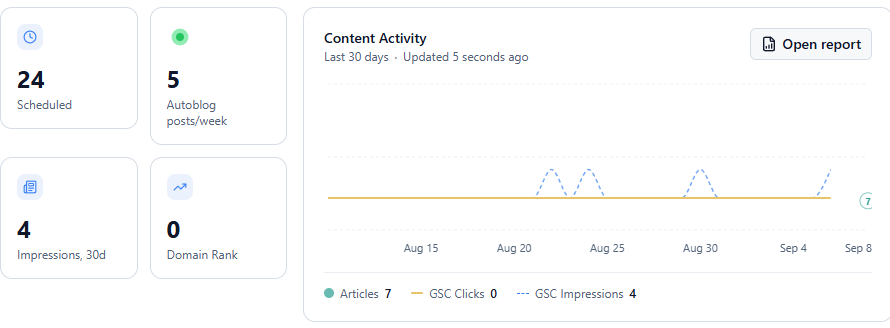
The main question for this website is simple:
Can RightBlogger help a brand-new website find realistic keywords, publish useful content, and begin gaining search visibility?
5 week update: Impressions and organic visitors already?
Website #2: Thousands of Impressions and Almost No Clicks
I purchased the second website from MotionInvest.
I liked the topic, and the site already had nearly 80 articles. It was receiving thousands of Google impressions and earning a small amount from Google AdSense.
The website looked clean and attractive from a design perspective. It also had some existing search visibility.
The articles were a different story.
Many of them were clunky and difficult to read. As someone who uses Rank Math and has experience changing meta titles and descriptions, I noticed another problem almost immediately.
The titles and descriptions appearing in Google search results looked robotic. They didn’t sound like a person had written them, and they weren’t very appealing.
The website had impressions, including some rankings in the top five positions, but very few people were clicking.
I added a social plugin to help share the articles on Pinterest, then started working through the pages with the highest impressions and lowest click-through rates.
I used the RightBlogger article rewriting tool on 20 articles so far. I also improved the titles and meta descriptions.
The difference in readability has been noticeable. Some articles went from feeling robotic and difficult to follow to sounding much more natural and useful.
Don’t Delete Established Articles When Rewriting Them
This is important if you use an article rewriting tool.
You generally shouldn’t delete an established article just because you want to improve it. The existing page may already have rankings, impressions, backlinks, and other SEO signals.
If you use RightBlogger to rewrite an article, I recommend copying the improved content into the existing post instead of creating a new URL.
That allows you to keep the history of the original page while improving the content, title, and description.
The main question for this website is:
What happens when I improve pages that are already receiving impressions instead of constantly publishing new articles?
I’ll track:
- Google impressions
- Average search position
- Click-through rate
- Organic clicks
- Changes to individual articles
- Performance of updated titles and descriptions
If existing impressions turn into more visitors, that may be more useful than simply publishing more content.
I’ve spent about 10 hours on this website so far. That includes receiving the site from MotionInvest, adding WordPress plugins, reviewing Google Search Console, and rewriting articles with high impressions but low click-through rates.
Some of these articles were ranking in the top five positions, but searchers still weren’t clicking.
The site is now connected to RightBlogger, and I’m using the dashboard to monitor the changes.
Current RightBlogger Overview:
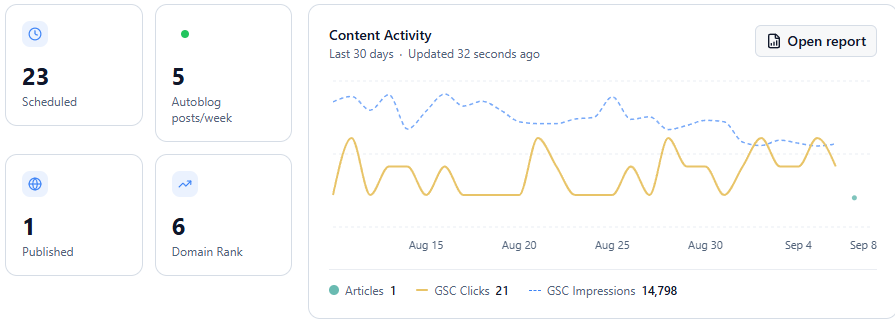
Website #3: Some Authority but No Clear Topic
The third website has a different problem, and it might be the most useful test for other website owners.
It has been online for a few years and already has published content. The website also has a Domain Rating of about 20.
That gives it a stronger starting point than the brand-new site.
The problem is that the content has no clear focus.
Over the years, I published articles about several unrelated subjects. If I were building the site today, I would choose a much tighter direction from the start.
At the time, it was mostly a personal website where I wrote about tools I was testing and topics I found interesting. I didn’t understand content clusters, topical authority, or the importance of organizing articles around related subjects.
This creates a different test for RightBlogger:
Can an AI SEO tool help organize an existing website and find ways to grow its traffic?
I’m using this website to test:
- Keyword clustering
- Content-gap research
- Related topics
- Internal linking
- Content priorities
- Which subjects deserve more attention
RightBlogger includes keyword-clustering and content-gap tools that may help with this research.
Its SEO reports can also compare existing content with pages that rank for similar topics. The AI Agent has already identified several problems and made some changes for me.
This may be the most interesting part of the experiment.
A website with a few years of history and some authority could have more potential than a brand-new site. It may only need a clearer plan and better organization.
RightBlogger also has a Link Exchange that website owners can join. The requirement is a Domain Rating of 15 or higher.
Because this site has a Domain Rating of about 20, I’m eligible to participate even though the website currently receives very little traffic.
I’m interested to see whether the Link Exchange produces useful links and whether those links have any measurable effect. Link building can help build trust for a website, but I want to see what happens with actual results instead of assuming it will work.
So far, I’ve spent about one hour setting up RightBlogger for this website.
I connected it to Google Search Console through WordPress and ran the AI Agent. It quickly found several issues I hadn’t noticed.
I’m not rewriting every article right away. I want to see what the platform recommends before making large changes.
Current RightBlogger Overview:
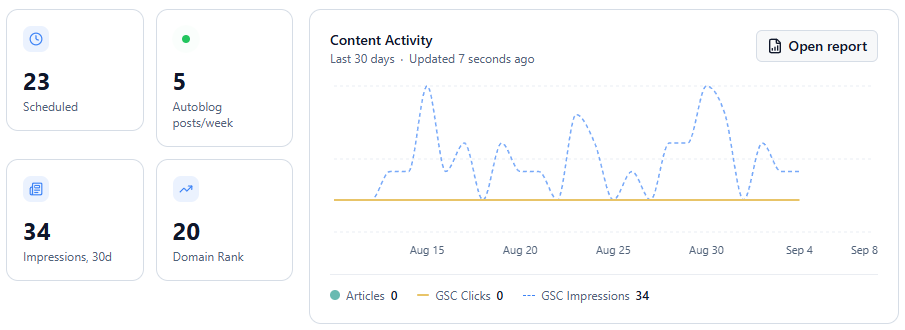
The main question for this website is:
Can RightBlogger turn a scattered collection of articles into a more organized SEO plan?
The Three Tests
Test 1: Starting From Scratch
The problem is that the website has no content base, authority, or search history.
I’m testing whether RightBlogger can help find realistic keywords and guide a new website toward its first rankings and visitors.
Test 2: Impressions Without Clicks
The problem is that Google is showing the website in search results, but searchers aren’t visiting.
I’m testing whether stronger titles, meta descriptions, and content improvements can turn existing visibility into more traffic.
Test 3: Existing Authority With Scattered Content
The website has some history and authority, but the content covers too many unrelated subjects.
I’m testing whether keyword research, content clusters, content-gap analysis, internal linking, and article optimization can create a clearer SEO plan.
I’m also testing the RightBlogger Link Exchange to see whether it provides useful links for an established website with a low traffic level.
What I’m Tracking
I’ll track several numbers across all three websites.
Organic impressions will show whether more people are seeing the sites in Google.
Organic clicks will show whether those impressions are turning into visitors.
Click-through rate is especially important for the second website, which already receives thousands of impressions.
Average search position will show whether individual pages are moving higher in Google.
Ranking keywords will help me see whether the websites are appearing for more relevant searches.
Content performance will show which articles improve and which ones stay the same.
Topical focus is harder to measure, but I’ll also look at whether the content becomes more organized and easier to understand.
The biggest question is simple:
Does the work lead to more traffic?
That matters whether you’re searching for the best SEO optimization tool, improving a small blog, or comparing SEO tools for WordPress.
Traffic doesn’t guarantee income, but without traffic, monetization is difficult. Before worrying about affiliate sales, advertising, or other income sources, I need to see whether these websites can attract more visitors.
I’ll Update This Article With the Results
This experiment should be more useful than a typical affiliate review because I’m not pretending to know the final answer before testing RightBlogger.
I’ll update this article as the data comes in.
If the platform produces meaningful improvements, I’ll share that.
If it works well for one website but not another, I’ll share that too.
If one of the tests fails, that information matters as well.
A tool may work well for improving existing articles but struggle with a brand-new website. It may help with keyword research but not produce better rankings. The only way to know is to test it across different situations.
What RightBlogger Includes
RightBlogger is more than an AI article writer.
The platform includes tools for:
- Keyword research
- Content planning
- Article creation
- SEO reports
- Content optimization
- Content-gap research
- Keyword clustering
- Headline analysis
- Meta titles and descriptions
- AI search optimization
- Website publishing
- Content maintenance
The goal is to keep more of the SEO process in one place.
I’m not expecting the software to replace judgment or personal experience. I still need to review the content, check the recommendations, and make sure the articles are accurate and useful.
I’m hoping it can reduce the amount of repetitive work involved in running several websites.
My Goals for the Three Websites
This is where the experiment begins:
- Three websites
- Three different SEO problems
- One AI SEO platform
My goal is to get clear, trackable results from each website.
Eventually, I’d like to monetize these sites. But monetization doesn’t mean much without visitors. First, I need to see whether RightBlogger can help improve the content, rankings, and traffic.
I also don’t want to spend endless hours at my computer updating articles, researching keywords, and watching SEO videos.
I’m looking for useful automation, not a tool that creates more work.
The three websites require setup and some initial effort. That’s expected. But with the Content Planner, I’m hoping the weekly time commitment becomes smaller as the experiment continues.
The sites have very different needs, so the results should give me a better idea of where RightBlogger is most helpful.
Personally, I hate those spammy “canned” reviews that are essentially saying, “I tried this tool, you should go buy it,” without sharing any actual, real experience.
I want to see what happens when the platform is used on websites with different starting points and problems.
I started this experiment during the first weekend of September 2026. I’ll continue updating the article as more data becomes available.
Try RightBlogger for Free
RightBlogger offers a 7-day trial with full access to the platform.
If you have an existing website that isn’t performing well, I recommend starting with the AI Agent. It can review your site and point out problems you may not have noticed.
That is one of the features I’ve found most useful so far, and the trial gives you time to test it without paying upfront.
I’ll update this article as the results come in.
Please remember that I’m an affiliate for RightBlogger. I may earn a commission if you join through one of my links.
